Category Archives: digital technology

Anti-Plagiarism Tools

plagarizing

At my (Cathy’s)  institution,  like most HE schools, plagiarism is an  issue.   According to Wikipedia, “Plagiarism is not a crime per se but in academia and industry, it is a serious ethical offense.”  I deliberately quote Wikipedia because that (sadly) seems to be a popular source for many students these days.  As the cartoon to the left implies, is copying from the internet plagiarism?  The many new sources for plagiarism checking indicates “yes”.  My institution supports a plagiarism locator called Turnitin.  It is a relatively simple tool to use. Once the text is submitted to the Digital Learning System, the tool highlights all words in sequence that can be located on the www and Google Scholar.  Hence, copying the words from Wikipedia becomes as evident as copying a paragraph from a journal article.  The professor has to look at the text and determine if the highlighted parts have been properly cited.  If not, the text is  plagiarized.  Although professors have access to this and can use it to check for plagiarism, it is used instead as a formative feedback took to encourage students to monitor their own work and how they are sourcing. Regarding Turnitin, Jennifer Haber, Professor of Communications at St. Petersburg College shares this email from one of her students:

Keeping an eye on the similarities percentage area keeps me aware of possible situations where I may be using too much (or even too little) outside resource information. Due to its ease of use and instructive benefit, I would say the service has played a significant part in my becoming a more improved writer. I would favorably recommend its use to any institution of learning.

This kind of feedback has sold Professor Haber on the use of this tool.  Besides Turnitin, many more of these tools are popping up on the internet.  Two popular sites are:  Best Plaigerism Checker and Proofreader  and  Plagiarisma.Net (links provider below).  With these kinds of free tools available and the  bad press plagiarism has been receiving, its  wonder that students still plagiarize.  Perhaps these tools will help reduce it happening in our schools.  Let’s hope so.

https://www.grammarly.com/plagiarismq=plagiarism&utm_source=google&utm_medium=cpc&utm_campaign=Search&utm_content=52804488846&utm_term=anti%20plagiarism%20checker%20free&matchtype=b&placement=&network=g&gclid=Cj0KEQjwmqyqBRC7zKnO_f6iodcBEiQA9T996EnCSJjGkjD4jvmQoquTIiBnRIyTkIHwt38N908eAMMaAvLd8P8HAQ

Plagiarisma.Net

http://www.turnitin.com/en_us/resources/blog/517-turnitin-educator-network/2381-what-students-say-about-turnitin

Coding is the Fourth Literacy?

I recently came across an article that suggested “coding is the fourth literacy,” and digital skills such as learning how to code should be part of the contemporary classroom, in order to prepare children/youth for the future job market. The article noted “the UK government instigated a complete overhaul of the computing curriculum in England and Wales…. [with] programming skills placed at the heart of the new curriculum. Now children as young as five are being taught computational thinking and digital creativity… By embedding coding into the new computing curriculum, the UK Department of Education stated the new subject would “ensure every child leaves school prepared for life in modern Britain”.

Link to the article: http://www.gamesindustry.biz/articles/2015-05-04-coding-has-become-the-fourth-literacy


SAMR: Bloom’s Taxonomy for technology education

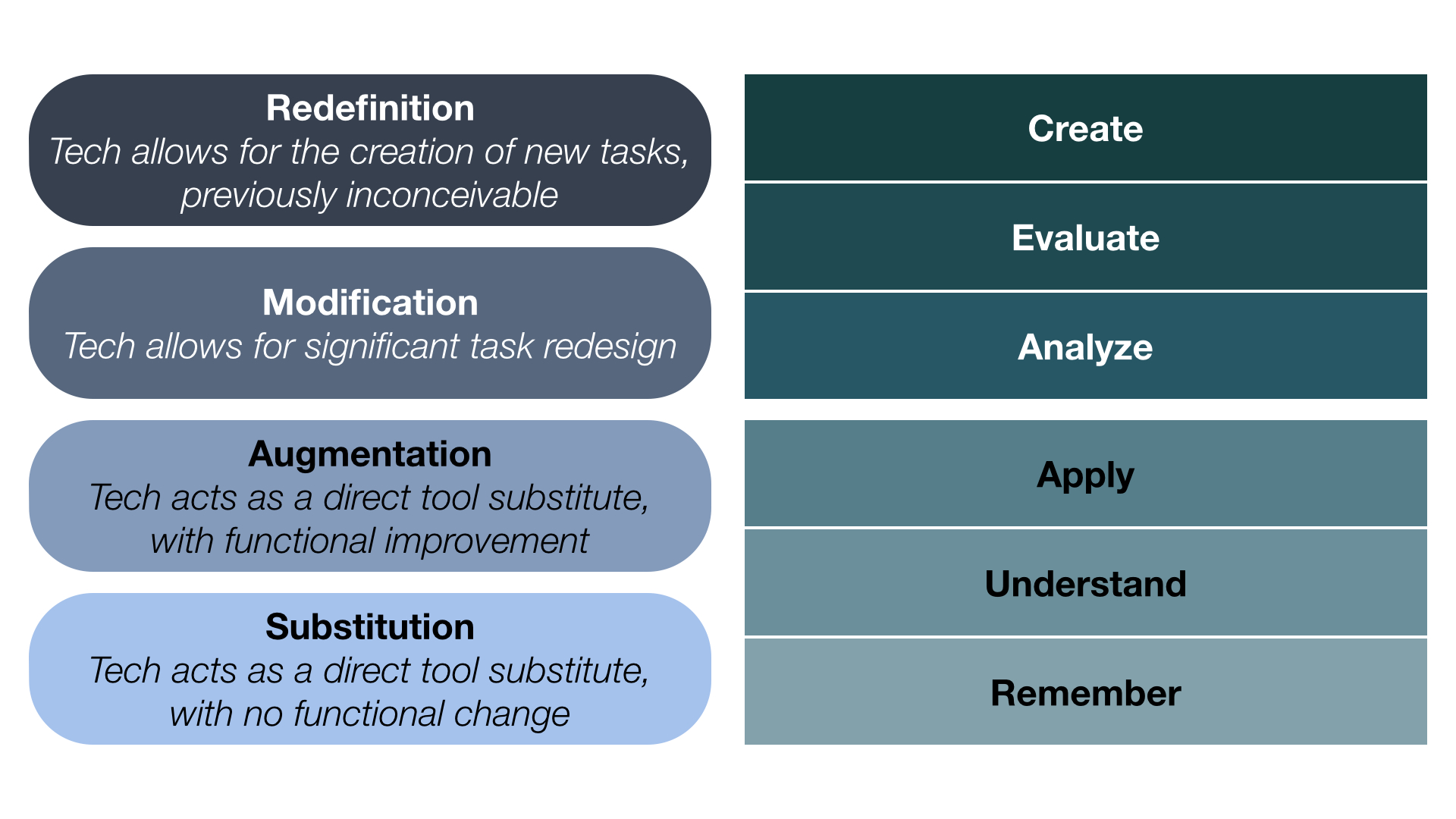
Dr. Ruben Puentedura developed the SAMR model as a way for teachers to evaluate how they are incorporating technology into their classroom practice.  Puentedura constructed his model in the form of a ladder and equates it with a student climbing the cognitive scale associated with Bloom’s Taxonomy.  (i.e. as a task moves from lower to upper levels of Bloom’s taxonomy, so does a task move from lower to upper levels of SAMR).

Below is a comparison of Bloom’s and SAMR:

diagram-puentedura

Puentedura’s model encourages educators to ask themselves if the student task is an act of substitution, augmentation, modification, or redefinition? The suggested threshold for moving from enhancing learning to transforming learning is between augmentation and modification.  As an example of this, consider a student writing a paper.  If the student writes the paper on a computer instead of on a piece of paper, this is an act of substitution.  If the student uses spell check and a formatting tool to assist with the writing process, this is augmentation as there is a slight change in the functional improvement.  Should the student publish the paper, perhaps on a wiki, blog site or through google docs, so other students can read it and give feedback, this is a modification of the process, for it now includes collaboration.  Lastly, in redefinition entirely new tasks are created which were inconceivable without computers and computer software tools.  In this level student transform their written stories into media productions using storyboards, filmed scenes and music.  Students can also publish these and receive feedback on the work.  In this level technology has redefined the task.

Working towards redefinition, is of course the goal for teachers who would like his/her students to be working in the highest thinking levels possible while using technology.

A short video introducing the SAMR model can be found at:                        https://www.commonsensemedia.org/videos/introduction-to-the-samr-model


Technology, inclusion, and innovation: Students design an app for literacy development

“It is estimated that only 10 per cent of blind children and adults know how to read braille. It is an illiteracy rate long ignored by technology developers who have created thousands of educational apps for the sighted”.

The above statistic is sad news however, I (Yiola) came across this most inspiring news:  students in an local middle school designed a computer app that can teach people who are visually impaired how to read braille.

How exciting for students to make such an impact in the literacy learning of others. How exciting for students to be learning about inclusion, literacy, and technology. How exciting to be engaged in the design and inquiry process in such a real way.

http://www.ctvnews.ca/mobile/sci-tech/ontario-students-braille-app-shortlisted-for-lego-innovation-prize-1.2329612

Wishing our local middle school students all the best in this endeavour.

Facebook Still Popular with Teens

An article I read in the Toronto Star the other day surprised me as it reported, “Facebook remains the most used social media site among American teens ages 13 to 17.” I had expected other social media tools (e.g. Instagram) to be more popular with teens. However, according to a recent study from the Pew Research Center, “Facebook was the site teens used most frequently, at 41 per cent, followed by Instagram at 20 per cent and Snapchat at 11 per cent. Boys are more likely than girls to report they visit Facebook most often — at 45 per cent versus 36 per cent of girls.” Are you surprised to learn that Facebook is still so popular with teens?

Link to the Toronto Star article: http://www.thestar.com/life/technology/2015/04/14/facebook-still-teens-most-used-website-report.html

SocialMedia

Mining Social Media

A recent CBC news article caught my eye because it highlighted how researchers, in fields such as psychology and computer science, are increasingly mining social media (e.g. Tweets; Facebook profiles) to gain insight into people’s physical and mental health. The article questioned if this method of data mining represents a means to conduct “personality research, without talking to any actual people.”  Computer scientist Michal Kosinski, from Stanford University, points out that “by looking at your Facebook profile or your Twitter feed, we can very accurately predict very intimate traits that you may not be aware you’re revealing.” How do you feel about this type of research – does it represent an innovative approach to health research or an invasive monitoring of our online space?

Link to article: http://www.cbc.ca/news/health/what-facebook-twitter-posts-reveal-about-your-health-1.3000893

SocialMedia

Embracing the Backchannel

The backchannel is the conversation that goes on alongside the primary activity, presentation, or discussion in your classroom. Victor Yngve first used the phrase back channel” in 1970, in a  linguistic context, referring to how people communicate back and forth alongside a conversation.  I (Cathy) have recently started using TodaysMeet as a backchannel chat platform to help me redirect the constant distractions or backchannel discussions in the classroom, especially, the digital ones. Have you ever been frustrated by the frequent use of digital devices (i.e. digital phones, computers, tablets) in your classroom that are not related to your lesson?  This tool may help.  I use TodaysMeet to help me harness the backchannel and redirect it onto a platform that can enable new activities and discussions.  My students are invited, through a link, into a “room” much like a chat room. I then project this “room” onto my screen for all to see.  As I progress through my lesson, questions and comments about the lesson are posted by the students through their own computers or other devices.

Below are a list of benefits from using backchannel tools in your classroom.

  1. Shy/introverted students are given a place to ask questions and contribute to conversations.
  2. Students who process information by asking a lot of questions can ask an unlimited amount of questions without dominating the classroom conversation. Everyone can see their questions and you can choose when to address their questions.
  3. Gauge students’ interest in and or prior knowledge of a topic.
  4. Extend your classroom conversations beyond the time in your school’s schedule. If you have started a backchannel during a classroom conversation and it’s going well you don’t have to worry about running out of time because you can have students continue the dialogue later in the day.
  5. Gauge the effectiveness of an activity in real time, by having students share questions and comments during an activity
  6. Conduct formative assessment by asking students about their understanding of a topic and gauging the responses

From :  http://www.freetech4teachers.com/2013/06/5-benefits-of-using-backchannels in.html#.VRAQv-E01q8

Other backchannel platforms include: Socrative, Padlet, and BluePulse. And, yes, tweeting on the same hash tag, during an event, is also a form of backchannelling. To obtain a comprehensive guide on harnessing the backchannel, follow the URL below: http://www.freetech4teachers.com/2013/09/backchannels.html#.VRAXx-E01q8

todaysmeet

Powtooning about Powtoon

I (Cathy) made a Powtoon about making a Powtoon.  Just follow the link below:

http://www.powtoon.com/show/dK9qzPurSC7/intro-to-powtoon/#/

If you are not familiar with Powtoon, it is an animated on-line presentation software tool that creates explainers, videos and presentations.  If you can create a power point, you can create a  Powtoon.  Only a Powtoon is much more interesting and fun!  It is an effective  tool for flipped classrooms and they make great multimodal assignments for students.  You can find many how-to videos on youtube.  My favourite was  on script writing (for powtoons):

https://www.youtube.com/watch?v=lyB1Y9xkSec

The Powtoon web site also hosts a set of tutorials to help you get started:

http://www.powtoon.com/tutorials/#prettyPhoto

The Powtoon I created was through a free account.  In that account I have access to  five minutes of Powtooning, 10 tunes and 11 animation styles.  Cant wait to make another.

Hope you give it a try!


Cartooning the Digtial World

Danish writer Mikael Wulff and cartoon artist Anders Morgenthaler are the creative duo known as Wumo (formerly known as Wulffmorgenthaler).  Their rise to success started in 2001 when they entered and won a cartoon competition. When they won, they received a one-month run of their comic strip in Politiken, a national Danish newspaper.  Their popularity soared with the new exposure, and they soon found more and more publishers, including several blogs and newspapers throughout Scandinavia and Germany.

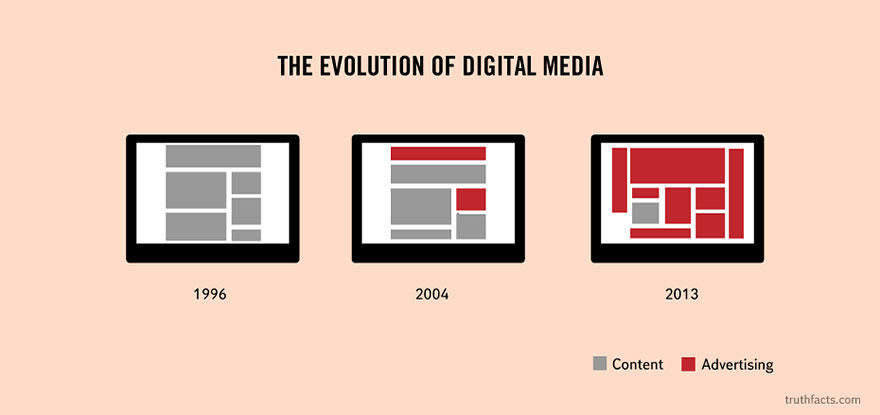
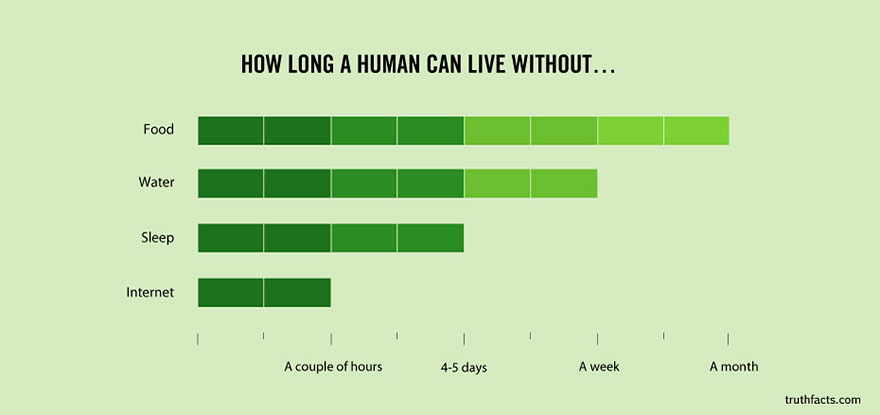
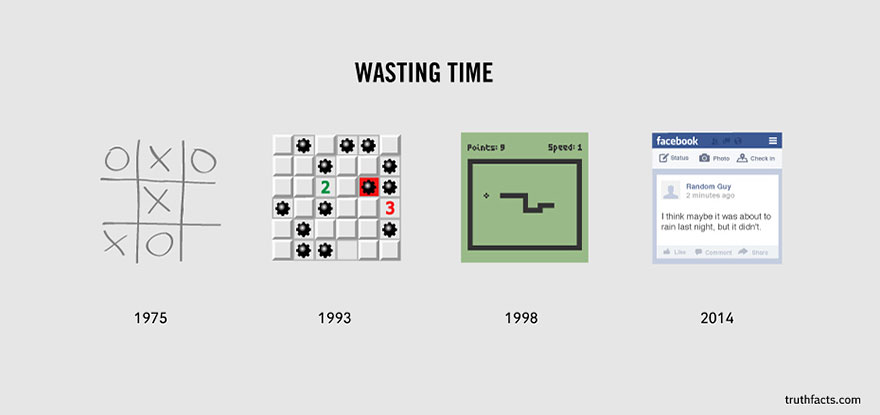
Among their works is a brilliant series of graphs and diagrams that illustrate some of the basic painful truths of everyday life in the Western world.  For your entertainment I (Cathy) have selected a few of my favourites that pertain specifically to digital technology and shared them below.  (Too enlarge a graphic, simply click on it).

Enjoy!

digitl medialed loled need interneted on line datinged facebooked wasting time

Bloom’s Taxonomy Meets the Digital World

One of the students in my (Clare’s) graduate course shared a version of Bloom’s Taxonomy which is linked to Web 2.0 tools. Although I have long had concerns about Bloom’s Taxonomy (using it like a checklist) I found this model interesting.


Bloom's Taxonomy

If you go to this site you can click on each tool:

http://digitallearningworld.com/tag/blooms-digital-taxonomy

I found this interesting and it got me thinking about how Web 2.0 tools range from glorified paper and pencil tasks to far more intellectually challenging work. Take a minute to click on the link above and then click on the programs. The pyramid was created by Samantha Penney: samantha.penney@gmail.com.