Tag Archives: Digital technology

A focus on digital literacy practices at AERA 2015

aera2015

I  just returned from another American Educational Research Association (AERA) conference. While in Chicago, I attended several sessions focused around literacy education, teacher education, and critical pedagogy and noticed digital literacy practices were discussed in all sessions. Interestingly, in the studies discussed digital technology was used not only as a tool to teach but a tool to re-imagine the definition and uses of literacy practices. Interesting sessions I attended included:

*Digital Storytelling as Method and Narrative Assemblage (Korina Jocson, University of Massachusetts)

 *Digital Storytelling as Racial Justice: Digital Hopes for Deconstructing Whiteness in Teacher Education (Cheryl Matias, University of Colorado & Tanetha Grosland, Morgan State University)

*Digital Authoring: Negotiations of Identity, Agency, and Power Among Girls Resettles as Refugees from Thailand (Delila Omerbasic, University of Utah)

 *Digital Storytelling in Preservice Teacher Education: Diverse Understandings of Writing, Pedagogy, and Meaning Making (Sandra Schamroth Abrams, Saint John’s University)

Benjamin Herold from the Education Week blog noticed a similar trend at this year’s conference. On his blog he said, “Digital reading and early literacy were among the hot topics at the annual meeting of the American Education Research Association, held here last week.” He describes the findings of four studies which study digital reading and early literacy. He noticed a common thread which ran through many of these papers: “It’s important to look at how digital devices, apps, and e-books are actually being used in classrooms, and the most promising literacy practices with these new tools involve lots of human-to-human interaction.”

Read Herold’s blogpost here:

http://blogs.edweek.org/edweek/DigitalEducation/2015/04/ipads_e-readers_literacy_research.html


Mining Social Media

A recent CBC news article caught my eye because it highlighted how researchers, in fields such as psychology and computer science, are increasingly mining social media (e.g. Tweets; Facebook profiles) to gain insight into people’s physical and mental health. The article questioned if this method of data mining represents a means to conduct “personality research, without talking to any actual people.”  Computer scientist Michal Kosinski, from Stanford University, points out that “by looking at your Facebook profile or your Twitter feed, we can very accurately predict very intimate traits that you may not be aware you’re revealing.” How do you feel about this type of research – does it represent an innovative approach to health research or an invasive monitoring of our online space?

Link to article: http://www.cbc.ca/news/health/what-facebook-twitter-posts-reveal-about-your-health-1.3000893

SocialMedia

Critically Reading Selfies

selfie

The term ” Selfie” was officially added to the Oxford Dictionary in 2013. People all around the world have been turning their phone camera around to capture themselves in a moment. Many people believe that our selfies reveal a lot about us. It is for this reason Professor Marino from University of Southern California has created an assignment for his students to critically read their selfies. His assignment is titled Know Thy Selfie 🙂 Marino believes that selfies help us analyze our identities because “each selfie bears information that can be used  to read our identity  characteristics: our race-ethnicity, gender, sexuality, and socio-economic status.”

The Assignment:

Write a thesis-driven essay in answering the prompt:

How do your selfies produce or obscure a sense of your identity?

1. Take or choose 5 selfies of yourself. You may be alone or with another person, but try to make sure you are a central and large part of the photo. All of the selfies should be different.

2. Examine your selfies for your performance of
Race-ethnicity
Socio-economic staus
Sexuality
Gender

3. Consider these identity characteristics independently and as they intersect.

Some questions for reflection as you prepare your response.

What in your selfies is accurate?
What is obscured or ambiguous?
Does the image portray one identity trait more than others?
Where do the images place you in the spectrum of possibilities for each characteristic trait — for example, more or less feminine or masculine?
How might different audiences perceive the images differently?
How is the viewer addressed in the image?
How do your selfies play off other well-known images? How do they play off each other?
What is the apparent context of this image? How does that affect how it might be read?

Read more about ‘Know Thy Selfie’ assignment here:

View at Medium.com

Cartooning the Digtial World

Danish writer Mikael Wulff and cartoon artist Anders Morgenthaler are the creative duo known as Wumo (formerly known as Wulffmorgenthaler).  Their rise to success started in 2001 when they entered and won a cartoon competition. When they won, they received a one-month run of their comic strip in Politiken, a national Danish newspaper.  Their popularity soared with the new exposure, and they soon found more and more publishers, including several blogs and newspapers throughout Scandinavia and Germany.

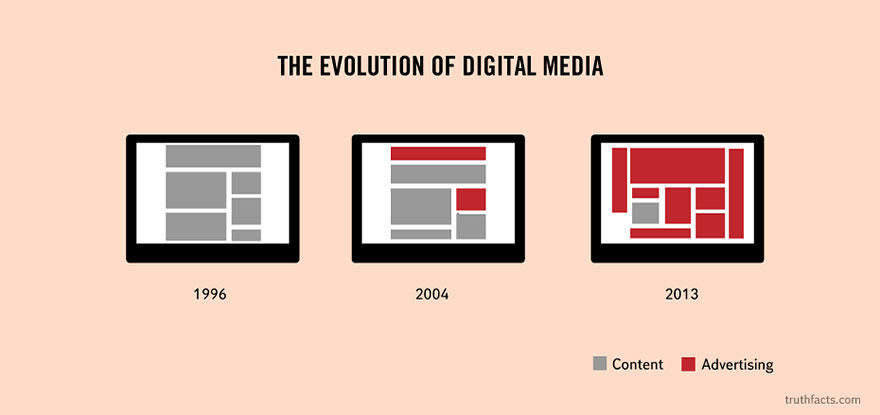
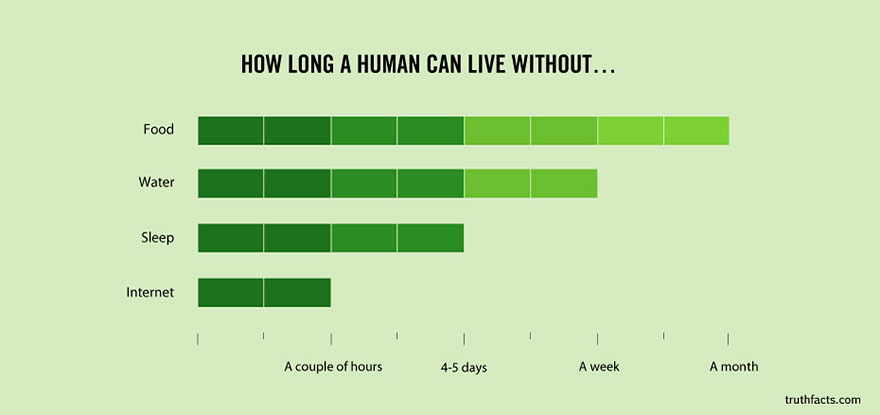
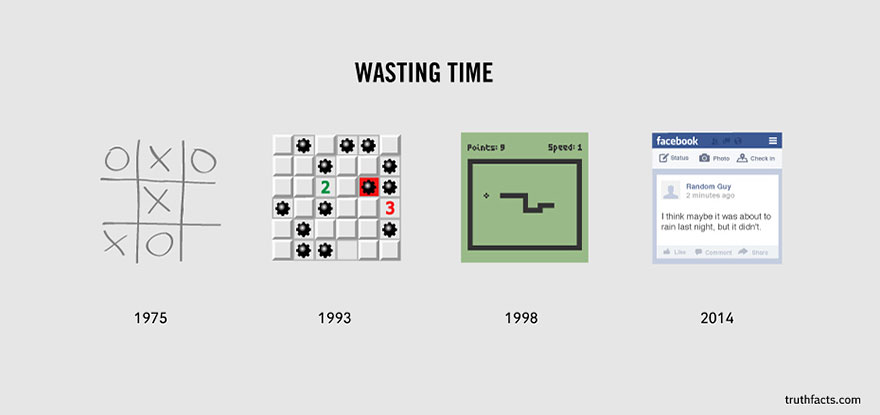
Among their works is a brilliant series of graphs and diagrams that illustrate some of the basic painful truths of everyday life in the Western world.  For your entertainment I (Cathy) have selected a few of my favourites that pertain specifically to digital technology and shared them below.  (Too enlarge a graphic, simply click on it).

Enjoy!

digitl medialed loled need interneted on line datinged facebooked wasting time

Bloom’s Taxonomy Meets the Digital World

One of the students in my (Clare’s) graduate course shared a version of Bloom’s Taxonomy which is linked to Web 2.0 tools. Although I have long had concerns about Bloom’s Taxonomy (using it like a checklist) I found this model interesting.


Bloom's Taxonomy

If you go to this site you can click on each tool:

http://digitallearningworld.com/tag/blooms-digital-taxonomy

I found this interesting and it got me thinking about how Web 2.0 tools range from glorified paper and pencil tasks to far more intellectually challenging work. Take a minute to click on the link above and then click on the programs. The pyramid was created by Samantha Penney: samantha.penney@gmail.com.

Neil Selwyn Raises Thoughtful Questions About Digital Technology in Education

I (Clare) have found Neil Selwyn’s writing about digital technology very helpful. In my Neil Selwyngraduate course we watched a talk by Selwyn (at Monash university). My students and I discussed his perspective on the place of digital technology and the consensus was – his perspective is valuable and educators need to consider the questions he raises. His stance is so sensible and balanced because he asks us to consider issues around digital technology that are often not part of the conversation. The video is about 1 hour and it is so worth the time. Here is the link:

https://www.youtube.com/watch?v=0q6bk3RVD9k

Below are some of the notes I made from the video. As you can see he is asking us to think carefully and deeply about technology (and he is a real techie!) I know you will never think of technology in the same way after watching his talk.

  •  We should not get carried away by digital technology because there are wider societal issues
  • Digital technology in higher education is very messy
  • Way we talk about digital technology is overly simplistic – the talk has been hijacked by other groups. Those in higher education need to be part of the conversation
  • place of digital technology is not inevitable – we have choices, need to activate our choices
  •  need to be critical and not just welcome digital technology as inevitable
  • what are the dominant arguments – need to understand the assumptions –

Assumptions

  1. Living in an information age
  2. Death of the institution is inevitable
  3. Crisis in Higher Education – HE fundamentally broken
  4. Period of Inevitable change for institutions

– RHETORIC IS CRISIS TONE – easy to get carried away by rhetoric

  • Need to be less extreme – neither hyper optimistic or hyper critical
  • Lots of change has been superficial – don’t believe the hype
  • digital technology talked about in radical ways
  • Selwyn wants us to think more carefully – why do we talk about digital technology in such extreme terms?
  • Term – disruption – heard again and again
  • What is actually being disrupted?
  • Blame is put on educators – deserve to be disrupted
  • Way digital technology is talked about – whole bunch of values attached to the talk and these things
  • Way we actually use digital technology is mundane and prosaic
  • So what has actually changed?
  • Complaints about universities – “googleized” environment –
  • Bleed of your professional life into your personal life – realities of technology –  intensification of work – not the smart office
  • Survey of professors – tend to use ppt and Moodles mainly
  • How does digital technology enhance teaching and learning?
  • So why do we buy into the myth that digital technology will change everything?
  • Commercialization of education – Silicon Valley mentality – think entrepreneurial – education is broken need Silicon Valley to fix it
  • Profound distrust of educators – need outsiders to fix education
  • Cannot see technologies as neutral — What values are missing?
  • Education is communal – Education is about human contact – something about being in the presence of the teacher and with fellow students
  • What is going on when doing virtual learning? What values are there or not there? Do online courses force artificial discussion?
  • Does ppt dumb down teaching?
  • Working conditions – over 1,000 unread mailboxes – cc: everyone – bringing work home e.g., check emails on Sunday – work seeps into our life
  • Digital bill of rights – set up on-line learning differently – issues of privacy, use of data …
  • Issue of trust – not talked about in elearning
  • Online learning should be about innovation, creativity …. Passion, curiosity – not heard about in elearning
  • Could we teach without ppt?– Ppt designed for business – bullet points – students want bullet points – how does that change learning?
  • Instead of dumping content into virtual learning get students to create own reading lists
  • Have digital technology match our own pedagogy
  • Would it be possible to switch off email for the weekend?
  • Placard — WE ARE STUDENTS: NOT CUSTOMERS
  • Think about digital technology as questions not answers – what are we gaining? What are we losing? What are the second order effects? What is the real problem we are trying to address through use of DT? What are the values underlying DT? Whose values are being promoted?


The Most Popular Teacher Tools Used in 2014

As regular readers of this blog know, I (Clare) am very interested in using digital technology. Although I am not a techie I am always keen to learn more.  The fabulous website Edudemic has a great list of the top technology tools for 2014.  Very interesting and informative. I thought I would share it with others. The article can be found at: http://www.edudemic.com/10-popular-teaching-tools-2014/

By Edudemic Staff on December 11, 2014

Last year, Edudemic published a list of the most essential and popular educational tools used in modern classrooms across the globe. While many of 2013′s contenders retain top spots for 2014, there are a few new and noteworthy tools that made it onto this year’s list, and some of last year’s mentions have shifted in the rankings. We highly recommend taking a look at these “battle-tested” teaching tools; some of them may be a perfect fit for your modern classroom.

1. Google Apps for Education

Google World
Image via Flickr by topgold

It’s no surprise that Google once again reigns supreme. Google claims that more than 40 million students and educators use its suite of free apps. And why wouldn’t they? Google Apps for Education include tools like Google Docs, which helps student and teachers collaborate, and a calendar that helps students and teachers stay organized. The customizable security settings lend peace of mind, and it’s all ad-free. This suite of tools retains its top-dog position from 2013, thanks to its utility and because it continues to be so wildly popular with educators on a worldwide scale.

2. Twitter

Twitter stays planted firmly in its number two spot primarily because it has evolved into a legitimate place for growing a personal learning network (PLN) among educators. More and more teachers, in fact, are realizing just how handy this social network is when it comes to stimulating thought-provoking discussions. Educator Chris Bonke, whose story appeared on The Atlantic’s website, says he initially hesitated to use Twitter for his Freshman English class at North High School in Downer’s Grove, Illinois. However, Bonke explains that he found it helped his students engage in conversation about their assigned reading material.

3. YouTube

What student wouldn’t choose to watch YouTube rather than read a textbook? This video-sharing platform is a universe in itself, with myriad channels that can help educators. Among the most popular channels that are bound to capture students’ attention is Shots of Awe, which presents fascinating facts about a range of scientific topics. For its ever-growing usefulness, YouTube moved up a spot in the rankings from last year’s list.

4. Edmodo
ImageEdmodo
Image via Flickr by espiche

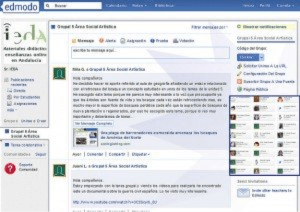
Edmodo, like Google, boasts more than 40 million members. This all-in-one learning platform gives teachers the power to easily schedule homework and assignments, read about the latest trends in education, network with other teachers, and monitor student progress. The best part? Unlike other industry-leading learning management systems, Edmodo is free. Last year, Edmodo came in at number seven, but its booming popularity has secured the number four spot in 2014.

5. Remind

The most popular upstart to break into this year’s list is Remind. One in four teachers use the app, according to a recently published article by NPR. “Think of it as a combo of sticky note and class newsletter for the digital age,” writes nprED reviewer Elissa Nadworny. “Remind allows teachers to send messages — via email, cellphone, iPad or Android device — to an entire class with the push of a button.” Businessweek says that about one million teachers and 17 million students and parents use Remind. The app is particularly popular in Texas, Georgia, and Alabama, where between 40 and 50 percent of teachers use it. Remind is a newcomer on our list of popular teaching tools, but its star is clearly rising.

6. WordPress (and other Blogging Software)

Last year, WordPress came in at number nine on our list, but this year we moved this platform (and all of its associated blogging tools) to the number six spot because of its value to educators. Teachers can start a classroom blog that all students can contribute to; this encourages them to think deeply about what they are learning and engage in discussions. It also serves as a fun way to help them hone their writing skills.

7. Evernote

Evernote proudly points out that it has more than 100 million users. A good number of those users are teachers. They make use of the app to share information with students and substitute teachers, organize lesson plans, and jot down ideas. The tags and reminders features can help you stay on schedule and on top of all your material. Last year, Evernote came in at number five on the list, and the only reason it dropped a few places is because there are so many other awesome teaching tools that merit a mention. See Edudemic’s recent walkthrough on using Evernote to build student portfolios to get an idea of this tool’s potential for your classroom.

8. EDpuzzle

ImageEDpuzzle
Image via edpuzzle.com

EDpuzzle is another newcomer on the list, and its spot is well-deserved, thanks to its ability to transform any video into a real lesson. With EDpuzzle, you can add your voice to videos or even insert questions. You can also search for useful videos across multiple platforms including YouTube and LearnZillion. If you want your students to slow down and digest the material, you can disable skipping on a video.

9. Easel.ly

Easel.ly is a relatively new tool; it stepped onto the scene in 2012, and since then, it has welcomed more than 300,000 users. This free gem lets you create custom infographics. Whether you want to break down a complex idea using charts and images or just want to highlight some main points, Easel.ly lets you do it — well, easily. As Easel.ly continues to evolve, we wouldn’t be surprised to see it climb a few spots on this list.

10. Dropbox

Dropbox is another cloud storage service that gives you easy access to your documents at any time and any place. All you have to do is drag a file or folder into Dropbox, and it syncs across all your devices. Even though it was number six on our list last year, this app has fallen to the 10th spot because Google Drive has usurped much of its functionality.

Honorable Mentions

The following are some teaching tools that we showcased on last year’s list. They still have undeniable value to educators, but were bumped off the list because they’ve become more stagnant in popularity than the exciting newcomers that have supplanted them:

  • Skype: This communication service lets you collaborate with colleagues or students around the world. Skype took the number three spot on last year’s list.
  • Socrative: Socrative came in at number 10 last year. It is a platform that encourages student discussion by allowing teachers to create assessments and activities and keep an eye on how students perform.
  • Class Dojo: This app was in the number eight spot on last year’s list. It is a perfect fit for elementary school classrooms because it lets you instantly reward good behavior and point out less-than-ideal behavior. A little more than 2 million teachers use Class Dojo.

We don’t blame you if all the teaching tools available to educators leave you feeling a tad overwhelmed. Try them out one at a time and see what works for your classroom!


Explaining Explain Everything (App)

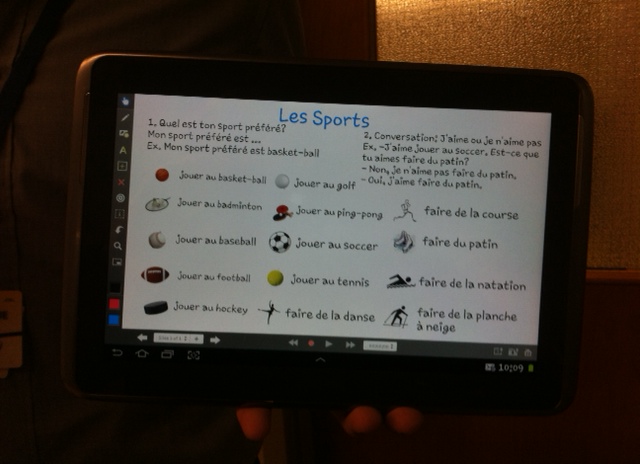
I (Cathy) find that one of the exciting aspects of teaching is learning from my students- especially about digital technology.    One of my student teachers, Drake, taught a lesson last week using Explain Everything.  With the aid of this app he successfully taught  a lesson in French which enabled his grade 6 students to engage in conversations about sports.  How he used the app was definitely key to the success of his lesson and I gave him full credit for cleverly scaffolding the sequence of the questions and answers so that that student conversations were set up for success.  Yet, Drake insisted it was the app that enabled him to teach the lesson so clearly.  Below are pictures of how Drake set up the lesson on his ipad and then mailed it to himself as a handout for his students.  Well done Drake!

Drakeipad

Intrigued, I began to play with this app myself.  I discovered it has a wide range of  applications. It feels like a cross between a power point and a smart board, but completely doable on an ipad.   Very convenient.  Below is an link to a you tube video that demonstrates how students can use the app in a classroom.


Using Instagram in the Classroom

They say a picture is worth a 1000 words. That is probably one of the reasons why Instagram has become my social media app of choice. I love the simplicity of it. There are no words, simply photos. You get to see what your friends, acquaintances, and public figures (you choose to follow) are up to. My use of facebook has slowly dwindled while my use of Instagram has quickly ramped up. This seems to be the general trend across the world. As educators in this digital age, we think about how to integrate social media effectively into the classroom. Facebook, wikis, blogs and twitter have made their way into many classrooms; however, Instagram is rarely used. I found this very cool infographic for educators and the use of Instagram in the classroom.

All of the below suggestions can be used in K-12 classrooms. Some can be used in higher ed. Contexts.

***Note: Before using Instagram in the classroom:

  • I think educators should have separate Instagram accounts if they are also using it for personal purposes.
  • Also, as a class you should establish a hashtag. So, if your students want to hashtag a relevant picture it gets included in the class hashtag.

10-ways-to-use-instagram

http://www.weareteachers.com/blogs/post/2014/08/07/10-ways-to-use-instagram-in-the-classroom

What Your Students Really Need to Know About Digital Citizenship

I (Clare) read with interest this article about digital citizenship which seems to be a new frontier in using technology. Thought others might find it interesting – for their own safety and in their work with students. The article was published in Edutopia http://www.edutopia.org/blog/digital-citizenship-need-to-know-vicki-davis?utm_source=SilverpopMailing&utm_medium=email&utm_campaign=102914%20enews%20didgectznship%20ngm%20remainder&utm_content=&utm_term=feature1hed&spMailingID=9792002&spUserID=MTM5ODM0MTEwNjMwS0&spJobID=402556106&spReportId=NDAyNTU2MTA2S0

The greatest software invented for human safety is the human brain. It’s time that we start using those brains. We must mix head knowledge with action. In my classroom, I use two essential approaches in the digital citizenship curriculum that I teach: proactive knowledge and experiential knowledge.
Proactive Knowledge
I want my students to know the “9 Key Ps” of digital citizenship. I teach them about these aspects and how to use them. While I go into these Ps in detail in my book Reinventing Writing, here are the basics:
1. Passwords
Do students know how to create a secure password? Do they know that email and online banking should have a higher level of security and never use the same passwords as other sites? Do they have a system like LastPass for remembering passwords, or a secure app where they store this information? (See 10 Important Password Tips Everyone Should Know.)
2. Privacy
Do students know how to protect their private information like address, email, and phone number? Private information can be used to identify you. (I recommend the Common Sense Media Curriculum on this.)
3. Personal Information
While this information (like the number of brothers and sisters you have or your favorite food) can’t be used to identify you, you need to choose who you will share it with.
4. Photographs
Are students aware that some private things may show up in photographs (license plates or street signs), and that they may not want to post those pictures? Do they know how to turn off a geotagging feature? Do they know that some facial recognition software can find them by inserting their latitude and longitude in the picture — even if they aren’t tagged? (See the Location-Based Safety Guide)
5. Property
Do students understand copyright, Creative Commons, and how to generate a license for their own work? Do they respect property rights of those who create intellectual property? Some students will search Google Images and copy anything they see, assuming they have the rights. Sometimes they’ll even cite “Google Images” as the source. We have to teach them that Google Images compiles content from a variety of sources. Students have to go to the source, see if they have permission to use the graphic, and then cite that source.
6. Permission
Do students know how to get permission for work they use, and do they know how to cite it?
7. Protection
Do students understand what viruses, malware, phishing, ransomware, and identity theft are, and how these things work? (See Experiential Knowledge below for tips on this one.)
8. Professionalism
Do students understand the professionalism of academics versus decisions about how they will interact in their social lives? Do they know about netiquette and online grammar? Are they globally competent? Can they understand cultural taboos and recognize cultural disconnects when they happen, and do they have skills for working out problems?
9. Personal Brand
Have students decided about their voice and how they want to be perceived online? Do they realize they have a “digital tattoo” that is almost impossible to erase? Are they intentional about what they share?
Experiential Knowledge
During the year, I’ll touch on each of these 9 Key Ps with lessons and class discussions, but just talking is not enough. Students need experience to become effective digital citizens. Here’s how I give them that:
Truth or Fiction
To protect us from disease, we are inoculated with dead viruses and germs. To protect students from viruses and scams, I do the same thing. Using current scams and cons from Snopes, Truth or Fiction, the Threat Encyclopedia, or the Federal Trade Commission website, I’m always looking for things that sound crazy but are true, or sound true but are false or a scam. I’ll give them to students as they enter class and ask them to be detectives. This opens up conversations of all kinds of scams and tips.
Turn Students into Teachers
Students will create tutorials or presentations exposing common scams and how to protect yourself. By dissecting cons and scams, students become more vigilant themselves. I encourage them to share how a person could detect that something was a scam or con.
Collaborative Learning Communities
For the most powerful learning experiences, students should participate in collaborative learning (like the experiences shared in Flattening Classrooms, Engaging Minds). My students will collaborate with others on projects like Gamifi-ed or the AIC Conflict Simulation (both mentioned in a recent post on game-based learning).
Students need experience sharing and connecting online with others in a variety of environments. We have a classroom Ning where students blog together, and public blogs and a wiki for sharing our work with the world. You can talk about other countries, but when students connect, that is when they learn. You can talk about how students need to type in proper case and not use IM speak, but when their collaborative partner from Germany says they are struggling to understand what’s being typed in your classroom, then your students understand.
Digital Citizenship or Just Citizens?
There are those like expert Anne Collier who think we should drop the word “digital” because we’re really just teaching citizenship. These are the skills and knowledge that students need to navigate the world today.
We must teach these skills and guide students to experience situations where they apply knowledge. Citizenship is what we do to fulfill our role as a citizen. That role starts as soon as we click on the internet.
Vicki Davis @coolcatteacher’s Profile