Category Archives: digital technology

Neil Selwyn Raises Thoughtful Questions About Digital Technology in Education

I (Clare) have found Neil Selwyn’s writing about digital technology very helpful. In my Neil Selwyngraduate course we watched a talk by Selwyn (at Monash university). My students and I discussed his perspective on the place of digital technology and the consensus was – his perspective is valuable and educators need to consider the questions he raises. His stance is so sensible and balanced because he asks us to consider issues around digital technology that are often not part of the conversation. The video is about 1 hour and it is so worth the time. Here is the link:

https://www.youtube.com/watch?v=0q6bk3RVD9k

Below are some of the notes I made from the video. As you can see he is asking us to think carefully and deeply about technology (and he is a real techie!) I know you will never think of technology in the same way after watching his talk.

  •  We should not get carried away by digital technology because there are wider societal issues
  • Digital technology in higher education is very messy
  • Way we talk about digital technology is overly simplistic – the talk has been hijacked by other groups. Those in higher education need to be part of the conversation
  • place of digital technology is not inevitable – we have choices, need to activate our choices
  •  need to be critical and not just welcome digital technology as inevitable
  • what are the dominant arguments – need to understand the assumptions –

Assumptions

  1. Living in an information age
  2. Death of the institution is inevitable
  3. Crisis in Higher Education – HE fundamentally broken
  4. Period of Inevitable change for institutions

– RHETORIC IS CRISIS TONE – easy to get carried away by rhetoric

  • Need to be less extreme – neither hyper optimistic or hyper critical
  • Lots of change has been superficial – don’t believe the hype
  • digital technology talked about in radical ways
  • Selwyn wants us to think more carefully – why do we talk about digital technology in such extreme terms?
  • Term – disruption – heard again and again
  • What is actually being disrupted?
  • Blame is put on educators – deserve to be disrupted
  • Way digital technology is talked about – whole bunch of values attached to the talk and these things
  • Way we actually use digital technology is mundane and prosaic
  • So what has actually changed?
  • Complaints about universities – “googleized” environment –
  • Bleed of your professional life into your personal life – realities of technology –  intensification of work – not the smart office
  • Survey of professors – tend to use ppt and Moodles mainly
  • How does digital technology enhance teaching and learning?
  • So why do we buy into the myth that digital technology will change everything?
  • Commercialization of education – Silicon Valley mentality – think entrepreneurial – education is broken need Silicon Valley to fix it
  • Profound distrust of educators – need outsiders to fix education
  • Cannot see technologies as neutral — What values are missing?
  • Education is communal – Education is about human contact – something about being in the presence of the teacher and with fellow students
  • What is going on when doing virtual learning? What values are there or not there? Do online courses force artificial discussion?
  • Does ppt dumb down teaching?
  • Working conditions – over 1,000 unread mailboxes – cc: everyone – bringing work home e.g., check emails on Sunday – work seeps into our life
  • Digital bill of rights – set up on-line learning differently – issues of privacy, use of data …
  • Issue of trust – not talked about in elearning
  • Online learning should be about innovation, creativity …. Passion, curiosity – not heard about in elearning
  • Could we teach without ppt?– Ppt designed for business – bullet points – students want bullet points – how does that change learning?
  • Instead of dumping content into virtual learning get students to create own reading lists
  • Have digital technology match our own pedagogy
  • Would it be possible to switch off email for the weekend?
  • Placard — WE ARE STUDENTS: NOT CUSTOMERS
  • Think about digital technology as questions not answers – what are we gaining? What are we losing? What are the second order effects? What is the real problem we are trying to address through use of DT? What are the values underlying DT? Whose values are being promoted?


Learning to Keyboard

Well, it’s Friday the 13th -a day I dread.  Although I (Cathy)  have never been a particularly superstitious person, I do believe in the law of averages.  And I have been  in three car accidents on Friday the 13th- never my fault!  What has this got to do with keyboarding you might ask?  Well, neck pain or whiplash (a common  condition resulting from car accidents), is exacerbated by constantly using a laptop placed on the lap.  Letting the head drop down towards the chest to view the keyboard, and letting it stay there for extended periods of time, worsens the condition.   Sooo, to help myself heal from all the unlucky car accidents (and acquire a 21st  century literacy skill ) I recently decided to learn to keyboard.  I now have an external keyboard attached to my lap top and a large screen monitor on my desk.  To view the screen I have to  keep my head up, neck erect and hands somewhere down there on the keyboard.   The goal, of course, is to not look down.  Yikes!  For those of you who are proficient at keyboarding, this might seem trite.  But there was a time when you didn’t know how, so try to be empathetic.

About one week ago I finally managed to make the transition.  My index fingers now automatically search out the little marker on the ‘j’ and ‘f’ keys so I know I am on the home row.  (My own children found this fact hilarious as they had forgotten those keys were even marked.  My husband , however is very impressed.  He says its too hard to learn).  Most importantly, I can now type without looking at the keys!  But dear, oh dear, m y    t y   p  i  n  g  i s ss ooo   ssss lll oooo wwww.  (If you only knew how long it took me to type this blog post!)

Yet, I persist.  Daily, I engage in a variety of  speed tests and even play typing video games.  (Yes, I can save the city from the aliens if I  type the correct word fast enough).  It’s actually quite fun.  I am constantly searching the net for new typing courses. My two favourites so far are:

Learning to Type at  http://www.learntyping.org/beginnertypinglesson3.htm

and

Typing for QWERTY   at  http://www.powertyping.com/qwerty/lessonsq.html

It’s amazing that effective courses like this are available on-line for free.

Now, if I coukd only type  bti faster, but stll be acrate, i might be able to find more ocurses… Sigh.  I wish I could just stay home today – not because it’s Friday the 13th-  I just really want to practice my keyboarding!


Questioning the Benefits of Toddlers’ Digital Technology Use

Researchers at Boston University School of Medicine suggest toddlers’ overuse of mobile digital technologies could hinder their social-emotional development. While the researchers recognize “that educational apps on smartphones and tablets may facilitate some academic skills for children” they voice concern that the extended use of such technologies by toddlers could displace valuable play-based interactions. The researchers point out that “toddlers younger than two years are known to learn best via hands-on exploration of their physical world.” Their commentary published in the journal of Pediatrics reviews  existing literature, examines future research directions, and suggests preliminary guidelines for families. What are your thoughts on this topic?

Link to CBC article: http://www.cbc.ca/m/news/topstories/toddlers-overusing-mobile-tech-may-stunt-development-1.2940848

Phoning vs Texting

I (Cathy) really like texting.  The post Clare shared with us last week entitled Texting is Killing Language really rang true for me.  It is a wonderful tool of communication.  My own children will text me regularly in lieu of using the phone.  Usually it’s fun, definitely like passing a note in class.  However, it also has its limits.  When should someone use a phone instead of a text message?    Following is a texting conversation between myself and my son while I was away on vacation…

in emerg

Y?

anorism?

CALL ME

Interesting how the  simplistic message spoke volumes and was loaded with emotion, yes? I have been told repeatedly not to use CAPS, because it is the equivalent of shouting.  In this incident I felt perfectly justified.

This incident reminded me of Hemmingway’s six word novel:

Baby shoes

For sale

Never worn

We can say sooo much with so little and texting is the perfect tool for this- within limits

Btw, number one son is fine.  Wasn’t an aneurysm- thank goodness.  But, I nearly had a heart attack while waiting for the call.  Sometimes, texting just isn’t enough, at least not for this mom.

When Caring Fuels Creativity

Students at a public school in Brampton Ontario are developing an app to help one of their classmates with autism learn math. One of the young developers, Priya Joshi explained that her classmate’s struggle with math was “our inspiration” so “we asked him some questions and that’s how everything started.” The FIRST Lego League, an international science and technology competition for young people, recognized the students’ design achievement with the rookie team award. Next month the students travel to Waterloo Ontario for the provincial level of the competition. Watch these inspiring students discuss the project at: http://www.cbc.ca/m/news/canada/toronto/sir-isaac-brock-students-make-autism-math-app-1.2934090


Inspiration from Pinterest

I (Cathy) find one of the most popular social media sites used by my student teachers is Pinterest.  They rave about the interesting and engaging ideas they find on the site for lessons.  I saw evidence of this just recently while visiting a school.   My student teacher, Melissa, had found a writing exercise on the site entitled, If I Was  Trapped in a Snow Globe.  It involved the students creating a snow globe scene inside of a white plastic container and then describing the adventure in writing.   The associate teacher was so excited by the results, she lead me into the hallway to see what  her young students had accomplished.  The associate declared, “This student never writes anything, but look at this!  Two pages!  They loved this writing assignment.”

Often, good writing results by students are the results of a good inspirational ideas. Luckily educators have many more resources to access now, due to social media.  I highly recommend Pinterest for many ideas in variety of subjects.

http://primarypunch.blogspot.ca/2013/01/thank-you-pinterest.html

globesstory

The Most Popular Teacher Tools Used in 2014

As regular readers of this blog know, I (Clare) am very interested in using digital technology. Although I am not a techie I am always keen to learn more.  The fabulous website Edudemic has a great list of the top technology tools for 2014.  Very interesting and informative. I thought I would share it with others. The article can be found at: http://www.edudemic.com/10-popular-teaching-tools-2014/

By Edudemic Staff on December 11, 2014

Last year, Edudemic published a list of the most essential and popular educational tools used in modern classrooms across the globe. While many of 2013′s contenders retain top spots for 2014, there are a few new and noteworthy tools that made it onto this year’s list, and some of last year’s mentions have shifted in the rankings. We highly recommend taking a look at these “battle-tested” teaching tools; some of them may be a perfect fit for your modern classroom.

1. Google Apps for Education

Google World
Image via Flickr by topgold

It’s no surprise that Google once again reigns supreme. Google claims that more than 40 million students and educators use its suite of free apps. And why wouldn’t they? Google Apps for Education include tools like Google Docs, which helps student and teachers collaborate, and a calendar that helps students and teachers stay organized. The customizable security settings lend peace of mind, and it’s all ad-free. This suite of tools retains its top-dog position from 2013, thanks to its utility and because it continues to be so wildly popular with educators on a worldwide scale.

2. Twitter

Twitter stays planted firmly in its number two spot primarily because it has evolved into a legitimate place for growing a personal learning network (PLN) among educators. More and more teachers, in fact, are realizing just how handy this social network is when it comes to stimulating thought-provoking discussions. Educator Chris Bonke, whose story appeared on The Atlantic’s website, says he initially hesitated to use Twitter for his Freshman English class at North High School in Downer’s Grove, Illinois. However, Bonke explains that he found it helped his students engage in conversation about their assigned reading material.

3. YouTube

What student wouldn’t choose to watch YouTube rather than read a textbook? This video-sharing platform is a universe in itself, with myriad channels that can help educators. Among the most popular channels that are bound to capture students’ attention is Shots of Awe, which presents fascinating facts about a range of scientific topics. For its ever-growing usefulness, YouTube moved up a spot in the rankings from last year’s list.

4. Edmodo

ImageEdmodo
Image via Flickr by espiche

Edmodo, like Google, boasts more than 40 million members. This all-in-one learning platform gives teachers the power to easily schedule homework and assignments, read about the latest trends in education, network with other teachers, and monitor student progress. The best part? Unlike other industry-leading learning management systems, Edmodo is free. Last year, Edmodo came in at number seven, but its booming popularity has secured the number four spot in 2014.

5. Remind

The most popular upstart to break into this year’s list is Remind. One in four teachers use the app, according to a recently published article by NPR. “Think of it as a combo of sticky note and class newsletter for the digital age,” writes nprED reviewer Elissa Nadworny. “Remind allows teachers to send messages — via email, cellphone, iPad or Android device — to an entire class with the push of a button.” Businessweek says that about one million teachers and 17 million students and parents use Remind. The app is particularly popular in Texas, Georgia, and Alabama, where between 40 and 50 percent of teachers use it. Remind is a newcomer on our list of popular teaching tools, but its star is clearly rising.

6. WordPress (and other Blogging Software)

Last year, WordPress came in at number nine on our list, but this year we moved this platform (and all of its associated blogging tools) to the number six spot because of its value to educators. Teachers can start a classroom blog that all students can contribute to; this encourages them to think deeply about what they are learning and engage in discussions. It also serves as a fun way to help them hone their writing skills.

7. Evernote

Evernote proudly points out that it has more than 100 million users. A good number of those users are teachers. They make use of the app to share information with students and substitute teachers, organize lesson plans, and jot down ideas. The tags and reminders features can help you stay on schedule and on top of all your material. Last year, Evernote came in at number five on the list, and the only reason it dropped a few places is because there are so many other awesome teaching tools that merit a mention. See Edudemic’s recent walkthrough on using Evernote to build student portfolios to get an idea of this tool’s potential for your classroom.

8. EDpuzzle

ImageEDpuzzle
Image via edpuzzle.com

EDpuzzle is another newcomer on the list, and its spot is well-deserved, thanks to its ability to transform any video into a real lesson. With EDpuzzle, you can add your voice to videos or even insert questions. You can also search for useful videos across multiple platforms including YouTube and LearnZillion. If you want your students to slow down and digest the material, you can disable skipping on a video.

9. Easel.ly

Easel.ly is a relatively new tool; it stepped onto the scene in 2012, and since then, it has welcomed more than 300,000 users. This free gem lets you create custom infographics. Whether you want to break down a complex idea using charts and images or just want to highlight some main points, Easel.ly lets you do it — well, easily. As Easel.ly continues to evolve, we wouldn’t be surprised to see it climb a few spots on this list.

10. Dropbox

Dropbox is another cloud storage service that gives you easy access to your documents at any time and any place. All you have to do is drag a file or folder into Dropbox, and it syncs across all your devices. Even though it was number six on our list last year, this app has fallen to the 10th spot because Google Drive has usurped much of its functionality.

Honorable Mentions

The following are some teaching tools that we showcased on last year’s list. They still have undeniable value to educators, but were bumped off the list because they’ve become more stagnant in popularity than the exciting newcomers that have supplanted them:

  • Skype: This communication service lets you collaborate with colleagues or students around the world. Skype took the number three spot on last year’s list.
  • Socrative: Socrative came in at number 10 last year. It is a platform that encourages student discussion by allowing teachers to create assessments and activities and keep an eye on how students perform.
  • Class Dojo: This app was in the number eight spot on last year’s list. It is a perfect fit for elementary school classrooms because it lets you instantly reward good behavior and point out less-than-ideal behavior. A little more than 2 million teachers use Class Dojo.

We don’t blame you if all the teaching tools available to educators leave you feeling a tad overwhelmed. Try them out one at a time and see what works for your classroom!


Ontario Grade 8 Students are “Computer-Savvy”

An article in the Toronto Star reported that Ontario students rank among the most computer-savvy according to an international survey of approximately 60,000 Grade 8 students in 20 countries. The survey evaluated various aspects of computer use including how well students could collect, create and share information. The EQAO (Education Quality and Accountability Office) coordinated the Ontario portion of the survey and jointly issued the report with the Council of Ministers of Education Canada (CMEC). The report suggests that Ontario students scored an average of 547 points out of a possible 600.

Link to the article:

http://www.thestar.com/news/gta/2014/11/20/ontario_students_among_the_most_computersavvy_in_international_study.html?utm_medium=twitter&utm_source=twitterfeed&app=noRedirect


Texting at the Table

Below is a link to a vignette that  really struck a chord with me (Cathy).  There is a lot to learn about the etiquette of texting.  According to Maralee McKee, “out attention is a gift.”

McKee also says,

Our full attention is the foundation of every kindhearted, other-centered interaction. Texting alters the continuity, focus, and momentum of our encounters.

It produces anxiety (mild to severe) in the other person, and whether they’re telling you (or even aware of it themselves) or not, they’re attention is apt to desire to focus on someone who pays them back equally.

These are big matters.

If we’re not being careful, texting can hurt our family, our friendships, our business relationships, even our ability to govern.

http://www.mannersmentor.com/only-at-work/seven-ways-to-text-with-graciousness-and-savvy

In the vignette a father makes his point to his sons the ‘old fashaoined way’.  Enjoy.

http://faithtap.com/2114/dad-asks-pass-the-salt-while-sons-text/


Explaining Explain Everything (App)

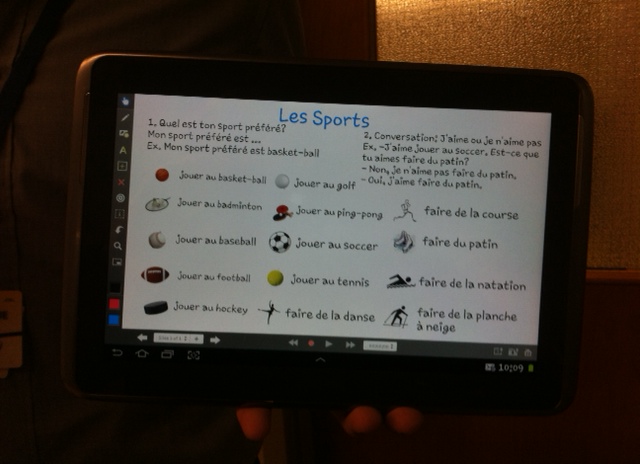
I (Cathy) find that one of the exciting aspects of teaching is learning from my students- especially about digital technology.    One of my student teachers, Drake, taught a lesson last week using Explain Everything.  With the aid of this app he successfully taught  a lesson in French which enabled his grade 6 students to engage in conversations about sports.  How he used the app was definitely key to the success of his lesson and I gave him full credit for cleverly scaffolding the sequence of the questions and answers so that that student conversations were set up for success.  Yet, Drake insisted it was the app that enabled him to teach the lesson so clearly.  Below are pictures of how Drake set up the lesson on his ipad and then mailed it to himself as a handout for his students.  Well done Drake!

Drakeipad

Intrigued, I began to play with this app myself.  I discovered it has a wide range of  applications. It feels like a cross between a power point and a smart board, but completely doable on an ipad.   Very convenient.  Below is an link to a you tube video that demonstrates how students can use the app in a classroom.