Tag Archives: Digital technology

A Book Printing Machine at Toronto Library!

books.jpeg

The CBC reported that this past weekend the Toronto Reference Library unveiled book printing machine which allows individuals to walk away with store-quality books. As of now, authors can print 10 copies of  their books (150 pgs) for $145. A bit pricey in my opinion, but definitely unique with a lot of great potential for students, writers, educators, etc. CBC reports that “What’s new is the ability to self-publish books – whether your own piece of literature, a cook book, dissertation or whatever you choose for a relatively.” The Toronto Reference Library will soon be offering courses on how to best format books for professional looking books.

Read CBC article here:

http://www.cbc.ca/news/canada/toronto/toronto-library-offers-store-quality-book-printing-to-customers-1.2670661


Guest Post: Monica McGlynn-Stewart: Talking Stickers

Image_TalkingStickersI (Monica) am an advisor to a team of recent MBA graduates from the University of Toronto who are one of six teams in the finals for a $1 million start-up fund for their product. Here is how they describe their work:

The Attollo technology assisted learning concept has been developed for use by parents and children in informal urban settlements in developing countries as part of the 2015 Hult Prize Challenge – which is the world’s largest student-based competition. Talking Stickers involves stickers with embedded bar codes (QR codes) that can be scanned by a device, which in turn is prompted to record and replay user generated audio content or replay pre-recorded audio content stored on the device. This spring and summer we have piloted our device in Toronto in George Brown College’s lab schools, and in Hyderabad, India and Mombasa, Kenya.

Whether these young professionals win the final prize this weekend or not, they are committed to bringing their technology to developing communities in India and Kenya to support the literacy learning of children in low-income communities.

Here is a link to a short video on their recent pilot projects in Kenya and India:

https://vimeo.com/139652753

Here is a recent article in The Globe and Mail about the project:

http://www.theglobeandmail.com/report-on-business/careers/business-education/beedie-selects-veteran-ali-dastmalchian-as-its-new-dean/article26401703/

Canadian school in global final for social enterprise prize

The question, on paper, is simply stated: How would you provide quality education by 2020 for 10 million children under the age of 6 living in the world’s urban slums?

Six business school teams from around the world, including one from Canada, think they have an answer to the question posed by organizers of the Hult Prize, a global competition for young social entrepreneurs that drew 22,000 applicants this year.

Next week in New York, at a session of the Clinton Global Initiative, a Hult partner, the winning team will walk off with $1-million (U.S.) and a chance to market a potentially game-changing, socially conscious business idea.

Win or lose, the four-person team of MBA graduates from the University of Toronto’s Rotman School of Management plans to pursue its idea for “talking stickers” – quick response bar codes that activate a low-cost reader enabling children to listen to a recorded voice or to record their own voice to say or sing the words.

For example, with talking stickers, the child (or parent) could use a hand-held device to scan a bar code near, for example, a bright yellow star on the page of a nursery rhyme book to hear Twinkle, Twinkle, Little Star. By scanning over a differently programmed sticker with a bar code, the child or parent then could record their voices to practice their language skills. The stickers are not just in books; they can be placed on household items, which then become tools for the language development of young children.

Earlier this year, having scrapped their initial idea for the Hult Prize, the members of Team Attollo (Latin for elevator) turned their attention to the literacy challenges faced by young children in impoverished countries. According to Hult Prize organizers, 112 million children up to 6 live in slums without access to schooling while 70 million children, more than half of whom are girls, are prevented from attending school.

“We found that language development and vocabulary is the key issue in early childhood development,” says Jamie Austin, who like teammate Lak Chinta, holds a PhD in neuroscience and earned a Rotman MBA this year. The other team members are engineers Peter Cinat and Aisha Bukhari, who earned their Rotman MBAs in 2014 and 2015, respectively.

Over the summer, with advice from early childhood professor Monica McGlynn-Stewart, the team conducted trials in Kenya and India, working with local school officials and families who cannot afford even modest school fees for their children. The early results were promising, with children and their parents adding to their vocabulary.

Meanwhile, with help from Toronto-based Autodesk Research and U of T engineers David Johns and Matt Ratto, the Attollo team developed a low-cost prototype for the hand-held device, with a view to making it affordable ($1.50 a month) to families who earn between $2 and $5 a day. As well, the team is working with local publishers and schools to develop school curriculum content for the stickers.

Over the summer, Hult Prize organizers brought finalists to a boot camp in Boston to make their business idea “investment ready.”

“It was a little bit collaborative and competitive,” says Mr. Austin, of the relationship with the other five teams. “We would talk out the ideas and we saw each other’s presentations every week,” he says, with coaching from academics and industry leaders. “We got tons of feedback from the Hult Prize business experts.”

Mr. Austin and his colleagues are so committed to their venture that, for now, they have quit their day jobs to found Attollo as a social enterprise company.

The other Hult finalists are: ESADE Business School (Spain); the University of Tampa (United States); Oxford University (England); and two from China – Jiao Tong University Shanghai Advanced Institute of Finance and National Chengchi University.

Follow Jennifer Lewington and Business School News by subscribing to an RSS feed here.

Contact Jennifer at jlewington@bell.net

Collaborative practice is the way to go: Growing as a Teacher Educator

Somehow, since the beginning of my teaching career, I have found myself in collaborative teams:

As a classroom teacher, I found amazing ‘teaching partners’. As a doctoral student, I was an apprentice in Clare’s literacy courses where collaborative practice was modelled. As a beginning teacher educator I looked to my mentors and found support through our strong research groups. Now, as a teacher educator I have developed strong partnerships with colleagues and have invited doctoral students to co-instruct my courses. How wonderful it feels to not only be a mentor but to learn from others while modelling good practice.

This year I am working with a doctoral student who has experience in teaching with technology. Not only am I learning a lot about practical use of technology in classrooms, and the theoretical underpinnings, but my students are benefitting from our partnership.  My course has gone from limited technology to a rich and authentic integration of technology. Let me share some examples:

  1. Developing a sense of Social Media/Digital Citizenship: We now have a class Twitter account and hashtag. We are composing tweets as a class, or as individuals which share what we are learning in the course.  This link helps those who do not know how to use twitter (i.e. me) get started: https://www.smore.com/x97w-the-14-day-twitter-challenge
  2. Improving communication: We now have the class connected with Remind, a communication app that many schools and teachers use to communicate with parents/students.
    1. When we first established this system our students raised the concern about access — what if parents do not have the technology to communicate in this year? What if they do not have the language to do so?  We had thoughtful, critical discussions about access and inclusion
  3. Demonstrating connected learning: My teaching partner is going to blog about the course, as a model for how teachers can do this.  She is walking us through the process of setting up a blog, including asking all the students to sign a permission form as a teacher would ask parents. If not all students sign the form to agree, she will model how to handle this in their future classrooms.
  4. Building our Digital Footprint: We are having students create About.Me or LinkedIn pages so when searched on Google, a professional reference to them, their work, and their values, will appear.  
    1. This experience will link closely to the course content. In our course we explore our Ministry’s Heath curriculum. The curriculum documents looks at teaching children about making good decisions when confronted with online challenges.  We explore how important it is to model good decision making online and to think about ourselves as professionals.
  5. Learning about online tools for teachers: Have one week with a Backchannel discussion tool. https://todaysmeet.com
  6. Connecting to a broader community: Our course looks at teaching the Arts. We are going to have a few students volunteer to look for arts integration projects on the crowdfunding site https://myclassneeds.ca/en/, present them to the class, and then have the class vote on which one we could support. Each person could donate a Loonie, and we could contribute $30 to a classroom in need somewhere near our community, or somewhere in Canada.

I am extremely excited about infusing these elements into my course. I have realized from our beginning classes that it is so much more than the actual doing and integrating of the technology that becomes important. I am learning that the discourses around the infusion is equally, if not more, relevant to developing good pedagogy.  I cannot say enough just how wonderful and beneficial collaborative practice can be.

I will let you know how it all plays out. I am anticipating a heightened program and learning experience for the students and me.

An Educator’s Guide To “Minding Our Digital Footprints”

In an article titled “Minding our Digital Footprints” the Edmodo blog outlined 9 elements of digital citizenship they use to frame their work. Edmodo is a K-12 social learning network which focuses on “connecting all learners with the people and resources they need.” I believe these elements can be applied to the work any educator is doing with their classes in digital technology spaces (e.g., class blog, class wiki).
Within each element questions are posed. Educators at all levels pose these questions to guide students as digital citizens while making them reflective of their own citizenship. The 9 Elements are listed below and are accompanied by some questions developed by Edmodo:
1. Digital Access
Does everyone in our community have equal access to digital resources? Think about the ways Internet use affecrts your daily social life and your school work: how might it change your life if you did not have access to it?
2. Digital Commerce 
What are smart precautions to take when buying and selling goods online?
3. Digital Communication
List as many tool you can think of that we use to communicate digitally as 21st century citizens. What are the appropriate decisions we need to make with these tools?
4. Digital Literacy
How do you use technology to learn? How do you learn about technology? What kind of information literacy skills do we need?
5. Digital Etiquette
What are best practices for responsible conduct in shared digital spaces?
6. Digital Law
When we are online, what are some laws and ethical/moral rules we should be aware of and follow?
7. Digital Rights and Responsibilities
What are the rights we have as digital citizens  that no one can take away from us? What are the responsibilities we have as digital citizens?
8. Digital Health and Wellness
What are some ways that using the Internet can be good for our health? How can it hurt us?
9. Digital Security
What are smart ways to protect our digital information?
Check out the full article here:

A Blog About Blogging

I (Clare) cannot get over how much I enjoy blogging! I found this great article on Teachers College Record about using blogging in the classroom. Since we have a blog I thought I would share the link with you. http://www.tcrecord.org/Content.asp?ContentID=18070

An excerpt of the article is below.

Advances in Technology Pave the Path to Actual Learning: Using Blogging as a Learning Tool

by Toni Ann Brzeski — August 17, 2015

Do you know what the most common electronic device that college student’s possess? According to Joshua Bolkan, a multimedia editor for Campus Technology and The Journal, “85% of college students own laptops while smartphones come in second at 65%”. If technology is becoming a common practice among our students, what are we doing as professors to incorporate it into our classrooms? How can students use technology to reflect on their work? How can instructors use technology as a supplement in reading and writing courses? How can technology be used to deepen our student’s critical thinking skills? These are questions we should be asking ourselves in a world where technology is paving the way to learning.

INTRODUCTION

After attending school, working at part time jobs and internships, participating in extracurricular activities and spending time with family, it might seem that college students are too busy to fit all of their activities into the hours of the day. Given the hustle and bustle of their everyday lives, most students simply do not have the time to reflect on any part of their day, let alone what they learned in their college courses (Sharkov, 2012). It is our responsibility as educators to keep up with our students, to understand them, and to make reflection on course work a priority. If our students are not reflecting on their learning as a part of their everyday lives, then we are not really doing our jobs as educators.

In order to get to the bottom of this issue, and make reflection a priority, we must ask ourselves what we are we doing inside of our classrooms to promote reflection outside of the classroom. What are we doing in our classes to develop better reading, writing, and critical thinking skills?

MAKING A CONNECTION WITH TECHNOLOGY

Each semester, students step foot into my classroom with needs and interests different from those students with whom I worked before. Every semester, it is my job to take needs and interests and learn how to integrate them into my courses. While every semester is different and challenging, I have found that today’s advances in technology have been the key to bridging the gap between my students’ needs and the course curriculum.

Four years ago, during my first semester at Bronx Community College, I asked my reading students to purchase the book Tuesdays with Morrie by Mitch Albom. At that time my students purchased the book from an actual bookstore or an online source and came to class with a paperback copy. In the fall of 2012 I asked my students to purchase the same book. What they did next surprised me: my students took out their Kindles and iPads and immediately purchased the book. It was simple: given the speed with which these electronic devices allowed my students to purchase the book, we were prepared to start reading it the following week.

There was not one student waiting on a delivery or taking time out of their busy lives to purchase it at the bookstore. What I learned from this experience is that we are in a world where our daily activities are rooted in our electronic devices. Kindles, iPads, and smartphones are devices that our students are not only actively using, but using comfortably. This is just about the time when I discovered blogging.

If my students were using technology to complete very ordinary tasks, such as buying a book for their college course, I then asked myself what other ordinary tasks my students are using technology for. At first I was hesitant—call me old fashioned—but I didn’t believe students would become better readers and writers by posting their reflections online. I continued to question myself. What good is this? Aren’t journals a place for reflecting and expression?

BLOGGING AND THE BENEFITS TO THE COLLEGIATE COMMUNITY

WHAT IS BLOGGING ANYWAY, AND HOW IS IT BENEFICIAL FOR THE COLLEGE STUDENT?

As stated by George Couros, the Principal of Innovative Teaching and Learning at Parkland School Division in Alberta, Canada, “We want students to think critically about what they write. They are more likely to do this when they write for a larger audience as opposed to simply [writing] for the teacher. [Blogging] gives students the ability to archive their work for many years to come.” Therefore, having the “ability to [blog] [and] write for a worldwide audience has made an impact on many of our students” (Couros, 2013). Like Couros, I have found that blogging has had a significant impact. In fact, blogging is the very form of technology that has helped bridge the gap between my students’ interests and required course work.

Blogging gives those students an outlet for expressing their own ideas and reflecting on what they learned in class from the comfort of their own homes. As less interactive students continue to exercise their writing skills through blogging, re-reading, and building on their blog posts, their writing gradually improves over the semester. The fact that students can go back to previous blog posts and add thoughts or reflect on their own blogs—thereby, revising their work on their own without being told to do so by their teacher—is extremely beneficial and rewarding (Sharkov, 2012).

Blogging can be done on a train, bus, or even in a student’s own bedroom. Blogging doesn’t require the school library, or even pen and paper. A student can simply use a smartphone to connect to the world through blogging. When you present this type of accessibility to the busy student, he or she has the opportunity to engage with classmates beyond the short period of time that the student spends sitting in the classroom before heading out to a job or internship.

I have witnessed the benefits of blogging first hand. Last semester, I posted a question as a homework assignment on my blog site regarding a reading on Edgar Allan Poe. Within an hour of my students leaving class, they started to write blog posts on the site. My students were responding to my question, expressing their views, and in turn completing their homework assignment, while commuting home from school.

As I read my students’ blog posts, I was amazed at the level of insight that they were expressing in their entries. I had created a place where my students’ voices could be heard, and a place where they were able to interact and discuss a topic outside of the classroom using information that they learned while inside of the classroom. In essence, my students were taking time to reflect on what they learned in class, even with their busy schedules. In the past I would have taken a more conventional approach to this homework assignment by passing out comprehension questions on white paper and telling students to answer and bring them back to class the following week.

Blogging is beneficial to the teacher as well. For example, in my EDU 10 class, our class blog page contains all our work and posts can be found in one place with easy access. I find my students accessing our blog page from their cellphones, which tells me that they are able to complete assignments from anywhere—very convenient for them.

As a professor, I can easily assess my students’ reading, writing, and critical thinking progress by observing the improvement in their blog entries. This also keeps the line of communication open between my students and myself, which is helpful since our class only meets twice a week for a little over an hour. This blogging platform keeps the reflection ongoing throughout the week. Further, blogging allows me to learn my students’ point of view on certain topics and demonstrates their level of comprehension on what we are learning in class, in turn, helping me to create a lesson plan for the next class.

Intertwining Digital Technology Into Literacy Methods Courses

Pooja and I (Clare) did an analysis of 6 literacy teacher educators who truly intertwined digital technology into their literacy methods courses. (Book chapter will be published soon and we will post that info.) In the meantime I thought this chart might be useful for literacy teacher educators who are preparing for the upcoming school year.

Overall Goal: Teaching 2.0
Specific Goals Example
Make literacy classes participatory ·      Post comments on each other’s work (e.g., Wall Wisher, Text tagging, Voice Thread)

·      Post comments in asynchronous time

·      Provide student teachers with feedback on-line and encourage them to respond to the feedback

·      During class student teachers post questions or contribute comments to a shared space

·      Before class student teachers post comments about the readings

·      Create Wordles when analyzing a text

Create an infrastructure for accessing resources and for sharing resources ·      Develop a repository of resources on a university platform (e.g., Blackboard) or on their own website

·      Share books, videos, websites on a class Wiki

·      Use DT tools (e.g., Smartboard) to access info on the spot while teaching

·      Access materials/videos for use in teaching (e.g., Globe Theatre productions of Shakespearean plays)

Provide authentic learning experiences ·      Student teachers make an iMovie on a specific topic (e.g., on bullying)

·      Analyze videos student teachers created during their practice teaching

·      Skype with authors they are reading

·      Participate in teacher communities by contributing to blogs and Twitter feeds

·      Participate in teacher-focused events (e.g., contribute a piece to a BBC competition on current affairs/news)

·      Student teachers create podcasts on an aspect of literacy to share with broader community

·      Watch videos of authors they are reading (both scholarly articles and children’s literature)

·      Student teachers post photographs of themselves on the university platform as a way to introduce themselves to their classmates

Gain an understanding of the increasingly globalized nature of literacy

·      View videos from other countries (e.g., teachers in Japan) to see similarities and differences with their own context

·      Participate in world-wide teacher communities

·      Participate in crowd-sourcing

·      Share statistics on literacy beyond home country

·      Use visual representations (e.g., photographs) to move student teachers beyond their immediate world to unpack a range of issues (e.g., gender representation in children’s literature)

Reframe issues related to literacy and literacy teaching ·      Watch videos of teaching (exemplary or poor practice) and analyze them

·      Use videos from their practice teaching classes as “data” for their inquiry projects

·      Student teachers select a picture from a photo array and relate the action in the photograph to a theory they have been working on

Bridge practice teaching and the academic program ·      Reflect on practice teaching by sharing and analyzing photographs/videos they took

·      Use email and social media to remain connected during practice teaching and as a place for student teachers to ask questions or share concerns

·      Create a video case study of pupils which relates to a theory of literacy

We also created a graphic to capture the elements of their pedagogy:

Literacy Graphci

Their courses were fundamentally different because they had truly reconceptualized their teaching, not simply tinkering by adding glitzy DT; rather, they constructed highly participatory experiences that occurred before, during, and after the official 3-hour class. Learning occurred in multiple ways: readings, f2f discussions, online communities, viewing, analyzing, and providing feedback on texts which immersed student teachers into the issues of literacy. It went far beyond introducing “methods” to teach literacy; it was framed by learning to teach literacy as a global citizen. This ambitious goal was matched with unparalleled support by the professors. Their multimodal/technology-rich teaching practices modeled the possibilities available to teachers and students; however, they were constantly trying to balance preparing student teachers to address the traditional forms of literacy, which they will probably observe in schools, with more expansive understandings. They had not discarded typical elements of literacy methods courses such as teaching the writing process or components of a balanced literacy program.

Technology vs Attention

lap top for pet owners_n

A friend of mine (Cathy) is a writer and she frequently complains about her darling cat sitting on her key board, especially when she has a deadline to meet.  The cartoon above reminded me of her, yet I doubt her cat would accept the new lap top model depicted.  I not not so sure it’s about closeness as it is about the attention.  Looking.  Listening.  Touching.  Speaking. I once tried to read  book while bottle feeding my son and he fussed and cried until I put it away.    At six months he knew where my attention was, and it wasn’t on him.  Holding him wasn’t enough.  Feeding him wasn’t enough.  That was our time and the book was cheating him.  I was amazed he could register that at such a young age.  It was a good lesson.   After that, I saved my reading for when he was napping.   I’m sure my friend’s cat would know too.   Although I was amused by the cartoon, I also saw it as a warning.  Our devices are seductive;  our lives are busy and demanding; but I’m not so sure we really get ahead by multitasking when it comes to attending to the ones we love.

“Tech isn’t a shortcut”

Source: http://blog.markitx.com/2012/08/13/ipads-in-the-classroom-and-their-continued-growth/

An article in Time Magazine makes an interesting case for why iPads should be left out of the classroom. Author Jervey Tervalon from Los Angeles argues that his school district (and perhaps several others) after spending millions “saw the iPad as a magic talisman that could just about transplant knowledge into students’ brains directly, bypassing teachers.” Through classroom teaching experience, Tervalon understands that “teaching isn’t always efficient. Often it’s messy, and because it’s messy, the process can produce epiphanies, and sparks of creative thinking.”

Tervalon warns that technology isn’t a shortcut to major educational reforms:

“An iPad is an amazing device but it isn’t so amazing without content or the right pedagogical context. School reform isn’t expensive tech and high-stakes testing; it’s the incredibly difficult task of creating highly functioning, transformative educational communities.

Link to the article: http://time.com/3926875/ipad-use-classroom/

Digital Technology Tools for the Classroom

Popular educational website Mindshift compiled a list of useful technology tools for the classroom. I have heard/used a few of the tools identified, however most are new to me. The article describes how these tools can be useful for social studies classrooms, but I think most tools can be used across a variety of subjects.

Below are a few I am most interested in exploring:

Screen Shot 2015-06-01 at 6.58.59 PM

Screen Shot 2015-06-01 at 6.59.08 PM

Screen Shot 2015-06-01 at 6.59.25 PM

Screen Shot 2015-06-01 at 7.01.16 PM

Read entire article here: http://ww2.kqed.org/mindshift/2015/05/21/favorite-tech-tools-for-social-studies-classes/

SAMR: Bloom’s Taxonomy for technology education

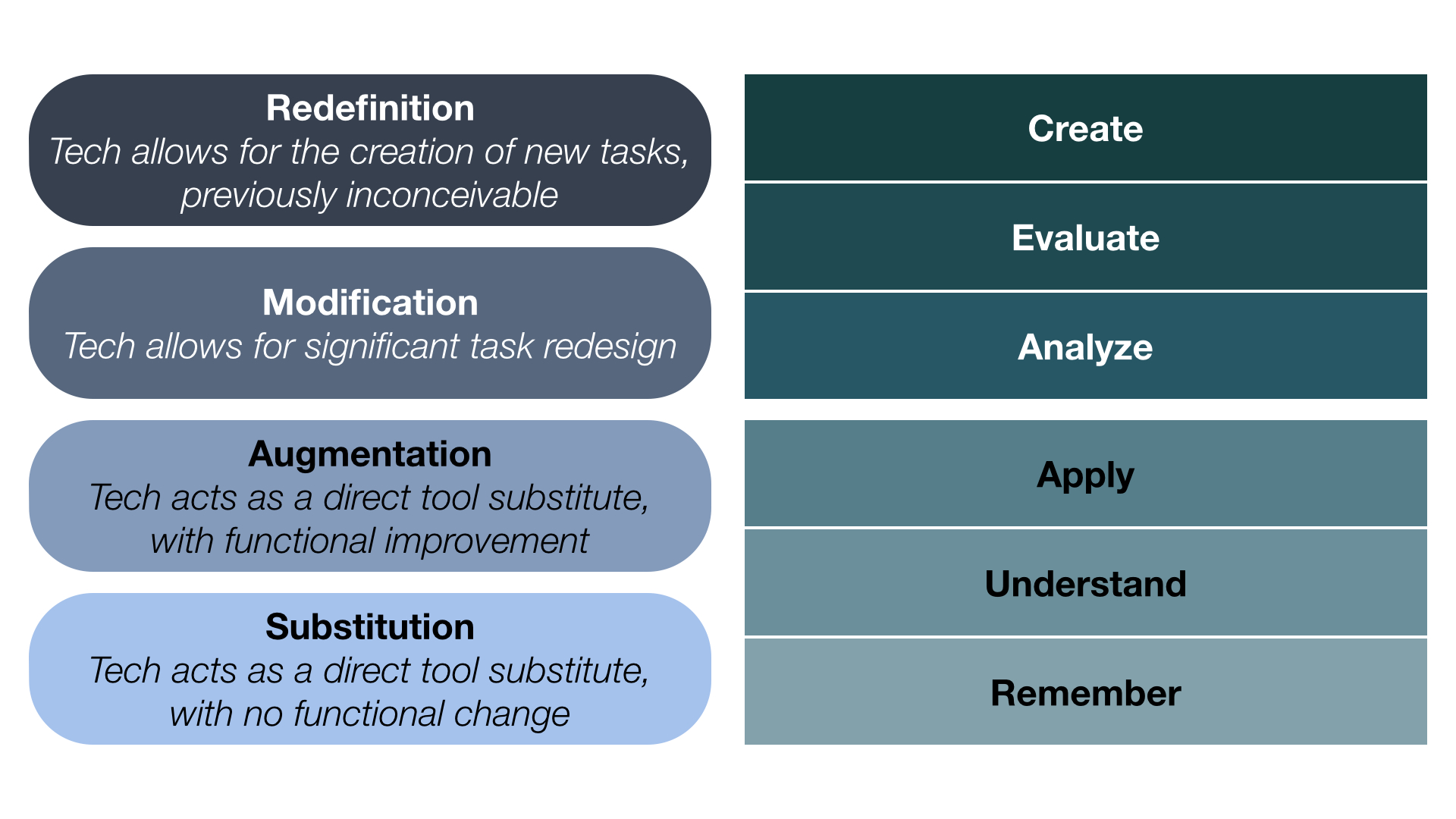
Dr. Ruben Puentedura developed the SAMR model as a way for teachers to evaluate how they are incorporating technology into their classroom practice.  Puentedura constructed his model in the form of a ladder and equates it with a student climbing the cognitive scale associated with Bloom’s Taxonomy.  (i.e. as a task moves from lower to upper levels of Bloom’s taxonomy, so does a task move from lower to upper levels of SAMR).

Below is a comparison of Bloom’s and SAMR:

diagram-puentedura

Puentedura’s model encourages educators to ask themselves if the student task is an act of substitution, augmentation, modification, or redefinition? The suggested threshold for moving from enhancing learning to transforming learning is between augmentation and modification.  As an example of this, consider a student writing a paper.  If the student writes the paper on a computer instead of on a piece of paper, this is an act of substitution.  If the student uses spell check and a formatting tool to assist with the writing process, this is augmentation as there is a slight change in the functional improvement.  Should the student publish the paper, perhaps on a wiki, blog site or through google docs, so other students can read it and give feedback, this is a modification of the process, for it now includes collaboration.  Lastly, in redefinition entirely new tasks are created which were inconceivable without computers and computer software tools.  In this level student transform their written stories into media productions using storyboards, filmed scenes and music.  Students can also publish these and receive feedback on the work.  In this level technology has redefined the task.

Working towards redefinition, is of course the goal for teachers who would like his/her students to be working in the highest thinking levels possible while using technology.

A short video introducing the SAMR model can be found at:                        https://www.commonsensemedia.org/videos/introduction-to-the-samr-model